Themes: Widgets & Icon Changer
- 4.7
- Rating
- 5.00M
- Installs
- Free
- Price
 Analysis by App-foxy
I tried Themes: Widgets & Icon Changer as a way to refresh an Android home screen without rebuilding everything from scratch. It sits in the personalization category and focuses on the visual parts people notice first: themes, icons, widgets, and wallpapers. The basic appeal is simple: instead of hunting through several separate apps, I could browse a single collection and work toward a more coordinated look.
My first impression was that this is best understood as a style library rather than a complete replacement for the phone’s operating system. It gives you material for changing the appearance of your home screen, but the final result still depends on your launcher, Android version, and how much manual adjustment you are willing to make. That distinction matters. If you want a quick visual refresh, it is convenient. If you expect every phone layout to transform perfectly with one tap, the experience may feel less automatic.
What the app actually offers and how the free model works
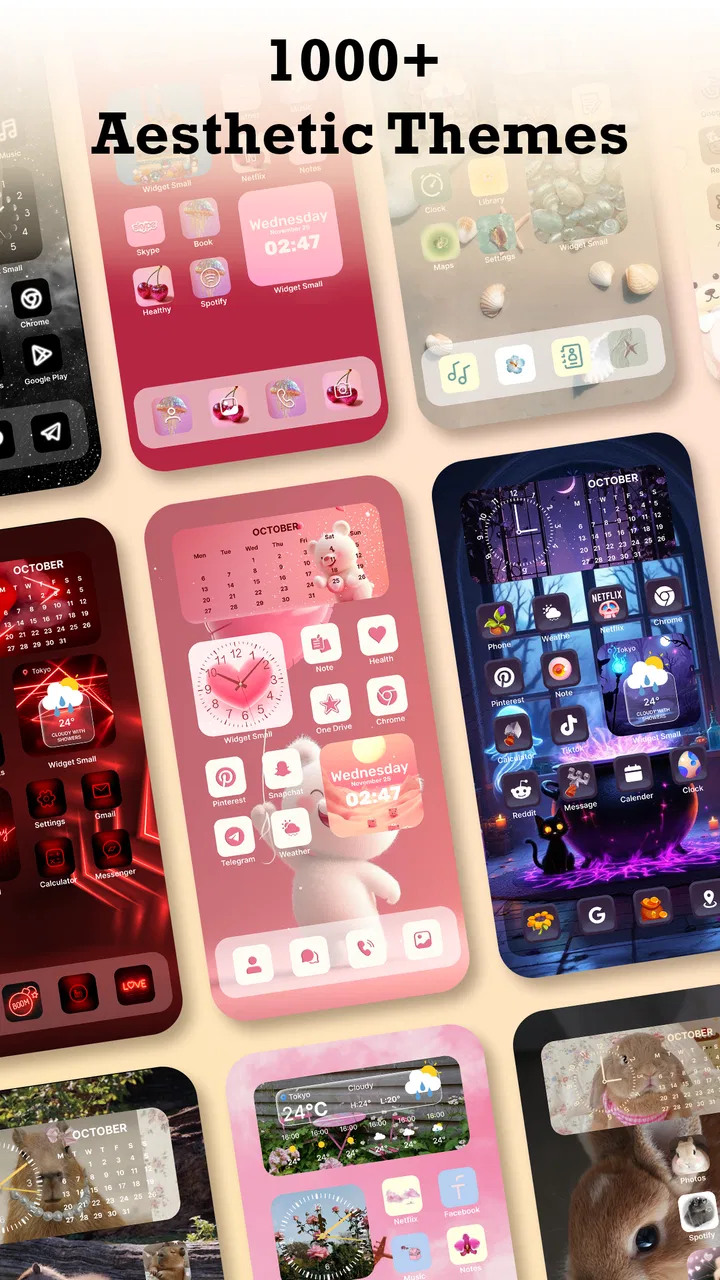
The app is developed by Maxlabs Personalization Tools and is free to install. Its store summary points to more than a thousand themes, icons, widgets, and wallpapers, so the main value is breadth: there is a large amount of visual material to browse before deciding on a style. I found that useful because it encourages experimentation. You can move from a restrained monochrome appearance to something brighter without committing money first.
You May Also Like

 Blood Strike: 2.5 Anniversary
Blood Strike’s Loadouts Turn Every Drop Into a Tactical Gamble
A close look at Blood Strike’s custom loadouts: how fast access to signature weapons reshapes its battle royale rhythm, rewards preparation, and narrows the gap between fights.

 Pandora - Music & Podcasts
Pandora’s Music Is Easy to Start, but Harder to Recover
Pandora’s strength is its low-effort path from a seed to a station. Its weak spot is how much confidence it asks you to place in connection, setup, and quiet recovery.

 8 Ball Pool
 Is Built on Rivalries, Rematches, and Routine
A close look at the rivalries, rematches, shared routines, and unanswered safety questions that turn a quick pool match into a persistent mobile community.

 Samsung Music
’s Quiet Strength Is Playing What You Already Own
Its reach comes less from spectacle than from dependable access to a personal library. That simplicity is both the app’s strongest retention engine and its ceiling.

 AccuWeather: Weather Radar
AccuWeather Review: A Quick, Clear Forecast for Everyday Decisions
For everyday plans, the best forecast is the one you can understand quickly. AccuWeather makes rain timing, radar, and local conditions easy to act on, with a few trade-offs.

 Hill Climb Racing
Why Hill Climb Racing Still Turns Crashes Into One More Run
A tiny car, a bumpy hill and one more upgrade: Hill Climb Racing keeps resurfacing because its simple chaos makes every near-miss feel personal.
More From Our News Desk



The free entry point is important here. You can explore the app without paying an upfront purchase, which makes it easier to judge whether its design language suits your phone. The app also contains in-app purchases ranging from $0.99 to $39.99 per item. That is a wide range, so I would not assume that every attractive item is included at no cost. Before applying a premium-looking pack, check the purchase prompt carefully and decide whether the specific visual change is worth paying for.
In practical terms, the free access works best as a discovery phase. I would begin by browsing several complete looks instead of selecting isolated icons immediately. A theme may look impressive because of its wallpaper, while its icon treatment may not suit the apps you use most. Looking at the whole combination first helps avoid paying for a style that only works in a preview.
The age rating is Everyone, which fits the app’s purpose as a visual customization tool. It is also available for Android devices running version 7.0 or later. That gives it a reasonably broad reach, although compatibility with the operating system is not the only factor. Launcher behavior and manufacturer-specific home-screen controls can still affect how smoothly icons or widgets are applied.
The current version is 1.7.1. I would keep the app updated if I relied on it for a regularly changing home screen, because personalization tools often depend on the way Android handles shortcuts, widgets, and launcher settings. The app has reached more than five million installs and holds a 4.7 average from around fifty thousand ratings, with 643 written reviews. Those figures suggest that the general concept works well for many users, but they do not guarantee that every phone will deliver the same setup experience.
How I approached the first setup
I got better results by treating the process like decorating a room rather than pressing every available apply button. First, I chose a wallpaper with enough empty space for icons and widgets. Then I looked for an icon style that remained readable at the small size used on a normal home screen. Only after that did I consider widgets. This order prevented the common problem of choosing a beautiful widget that crowded the layout or hid important shortcuts.
One useful habit is to take a quick screenshot of your existing home screen before changing anything. That gives you a reference for the positions of your most-used apps and makes it easier to restore a familiar arrangement if the new design is more attractive than practical. I also recommend changing one visual layer at a time. Applying a wallpaper, icon set, and widget arrangement all at once makes it difficult to identify which part caused an awkward result.
The app’s large catalog is helpful, but it can also create decision fatigue. I found it more efficient to set a narrow goal, such as “dark and low distraction” or “bright but readable,” and reject anything that did not fit. Without that filter, browsing becomes the main activity and the home screen remains unfinished.
Where the value is strongest in everyday use
The strongest use case is a phone that feels visually stale but still works perfectly. If you do not want to replace your launcher or spend time designing icons yourself, a ready-made collection can make the device feel new in a short session. I especially liked the idea of using the app before a seasonal change, a new phone case, or a shift from a busy work setup to a calmer personal layout.
A realistic example is a home screen used for work during the day. I would choose a subdued wallpaper, keep the first page limited to communication and calendar shortcuts, and use a widget only where it replaces repeated app opening. In the evening, a different arrangement with larger visual elements could make the phone feel less like a work tool. The value is not only cosmetic; a carefully arranged screen can reduce the time spent searching for frequently used apps.
Another non-obvious benefit is that a theme can act as a reset point. When my home screen has accumulated scattered shortcuts, old folders, and widgets I no longer use, selecting a new visual direction makes me more willing to remove clutter. I would not rely on the app alone to organize the phone, but its visual structure can encourage better decisions about what deserves space.
There is also value for people who enjoy matching several elements without creating each one manually. A wallpaper that clashes with an icon pack can make even good individual choices look unfinished. A coordinated collection gives you a starting point for color, contrast, and mood. That is more convenient than downloading separate wallpaper, widget, and icon apps and hoping their styles happen to align.
The app is less valuable if your current launcher already provides a strong theme engine and you enjoy building layouts yourself. In that situation, the catalog may still supply inspiration, but you may prefer the control of selecting every icon, spacing adjustment, and widget independently. The convenience of a prepared look becomes less important when customization itself is the hobby.
Three practical details that affect the final result
First, icon consistency matters more than the preview suggests. A theme may cover popular applications well while leaving less common apps with mismatched symbols or ordinary shortcuts. Before settling on a pack, I would check the apps visible on my first home screen, not just the sample arrangement. A single row of inconsistent icons can make the entire design feel less polished.
Second, widgets should be judged for information value, not only appearance. A decorative widget can look excellent in a screenshot but take up space that would be more useful for a calendar, weather view, or quick control. I would place only the widgets I can explain in one sentence: what information does this show, and how often do I need it? That test keeps the home screen attractive without turning it into a poster.
Third, wallpaper contrast deserves attention after the icons are in place. A background that looks balanced on its own may make white labels disappear or make small icons difficult to distinguish. I would test the layout in bright and dim conditions before deciding it is finished. This is a small step, but it prevents a visual upgrade from becoming a daily usability problem.
These details also explain why a large catalog is not automatically better for everyone. More choices help when you have a clear visual goal. They slow you down when you are looking for one perfect answer. I would rather spend a few minutes comparing complete arrangements than repeatedly install separate customization tools and rebuild the same screen.
How it compares with the usual alternatives
The usual alternative is to use the phone maker’s built-in wallpaper and icon controls. Those tools are often quicker for a basic change and may integrate more naturally with the device. Themes: Widgets & Icon Changer is more appealing when the built-in selection feels limited or when you want a broader range of coordinated styles in one place.
Another alternative is combining specialist apps: one for wallpapers, one for widgets, and another for icons. That route can offer deeper choice, but it also creates a consistency problem. Each app may use different previews, installation steps, and visual standards. A single personalization app is easier to browse, although it may not match the depth of a specialist tool in every individual area.
Manual launcher customization remains the best choice for someone who wants precise control. You can choose exact grid spacing, folder behavior, icon size, and gesture setup when the launcher supports those options. The trade-off is time. This app is aimed more at getting to a pleasing result quickly than at giving a designer control over every technical detail.
I would also distinguish between changing the look and changing the phone’s behavior. A themed home screen can make navigation feel fresher, but it does not automatically improve notification management, app organization, or performance. If your real problem is a crowded notification shade or a slow device, visual personalization will not solve it. In that case, launcher settings or system tools may be a better investment of your attention.
Tradeoffs, friction, and the people who should use it
The main tradeoff is convenience versus precision. A prepared theme saves effort, but it may not fit your exact app collection or preferred layout. You may still need to rearrange shortcuts, resize widgets, or leave some elements unchanged. I consider that normal for this type of app, but it is worth knowing before you expect a completely finished screen.
The purchase structure deserves the same practical caution. Free installation makes testing easy, while the in-app purchase range means the cost can vary considerably depending on what you choose. I would use the free browsing experience to establish whether the app has enough suitable material for my device before buying anything. If I only want one wallpaper, a separate free source may be better value. If I want a coordinated look and find several useful elements, a paid item can make more sense.
I would skip it if I dislike browsing visual collections, need a highly technical launcher setup, or want every icon on my phone to match perfectly without manual correction. I would also be cautious if the home screen is already efficient and I am only tempted by the novelty of changing it. Personalization can become a cycle of constant rearranging, and no theme can compensate for a layout that contains too many shortcuts.
On the other hand, I think it is a good fit for someone who wants a low-risk way to make an Android phone feel more personal. It is also useful for people who repeatedly struggle to coordinate wallpaper, icons, and widgets across separate sources. The free starting point lowers the barrier to trying a new style, while the catalog gives enough room to explore beyond the phone’s default appearance.
For a family member who is not interested in technical customization, I would recommend keeping the setup simple: one readable wallpaper, a familiar icon arrangement, and only one or two genuinely useful widgets. The app can help create that look, but I would not fill the screen with decorative elements just because they are available. For a design enthusiast, I would use it as a source of combinations and then refine the result manually through the launcher.
My buy-or-skip verdict
My verdict is to try it free, but buy selectively. The app delivers its best value when you want coordinated visual changes and do not want to assemble them from several unrelated tools. Its broad collection, accessible entry point, and focus on themes, icons, widgets, and wallpapers make it a practical choice for a home-screen refresh.
I would not call it an essential Android utility. Its value depends heavily on whether you enjoy changing the phone’s appearance and whether the available styles match your taste. The paid range also means you should judge each item on its own rather than assuming the free installation includes the whole catalog.
After using it, I would recommend starting with a complete theme, checking icon coverage for your most-used apps, and testing readability before spending money. If the result improves both the appearance and the way you find apps, the purchase may be worthwhile. If it only looks impressive in a preview but makes daily navigation slower, I would return to the simpler built-in controls.
The short version of my advice is this: use Themes: Widgets & Icon Changer as a curated starting point, not as a promise of perfect one-tap customization. For casual personalization, that balance is appealing. For exact control, a dedicated launcher and separate specialist tools may suit you better. In my experience, the app earns its place when it helps you create a cleaner, more intentional home screen without turning the process into a technical project.
FAQs for Themes: Widgets & Icon Changer
01What is Themes: Widgets & Icon Changer, and how does it work?
Themes: Widgets & Icon Changer is a customization app that allows users to personalize their smartphones by changing app icons and widgets. It offers a variety of themes and styles to match personal aesthetics. Users can select from pre-made designs or create their own, giving their device a unique look.
02Is Themes: Widgets & Icon Changer compatible with all devices?
The app is compatible with most Android and iOS devices. However, certain features may be limited based on the device's operating system version. It's advisable to check the app's compatibility on the store page before downloading to ensure all functionalities work smoothly on your device.
03Does using Themes: Widgets & Icon Changer affect device performance?
Generally, the app is optimized to have minimal impact on device performance. However, extensive use of custom widgets and icons might slightly affect battery life and speed, especially on older devices. It's important to monitor your device’s performance and make adjustments if needed.
04Are there any costs associated with downloading or using Themes: Widgets & Icon Changer?
Themes: Widgets & Icon Changer is free to download, but it may offer in-app purchases for premium themes and features. Users can enjoy many customization options without spending money, but opting for premium content can enhance the overall experience with more exclusive designs.
05How secure is Themes: Widgets & Icon Changer regarding privacy?
The app follows standard privacy protocols, ensuring user data is protected. It typically requires permission to access certain device features for customization. Reviewing the app's privacy policy is recommended to understand data handling practices and ensure personal information remains secure.
Pros
- Highly customizable widgets
- User-friendly interface
- Wide variety of icon styles
- Regular updates with new themes
- No technical skills needed
Cons
- Limited free features
- Occasional ad interruptions
- Some themes are paid
- Can slow down older devices
- Requires frequent updates

Themes: Widgets & Icon Changer
Gallery